Binary Number System
The binary number system is also called the base-2 number system because it consists of only two digits, 0 & 1. This makes it less complicated than other number systems since it comprises only two digits. Binary digits are useful for computing the results of devices that have two states, ON and OFF.
Note: Binary digits are called bits
- The numbers are formed using the two digits 0 and 1.
- It is useful in electronic devices and computer systems because it can be easily performed using just two state i.e., 0 and 1.
- Each digit in the number is at a specific place value that is a power of 2.
- From right to left – as powers of 2, i.e., 20, 21, 22, etc.
Binary to Decimal Conversion
A binary number is converted into a decimal number by multiplying each digit of the binary numbers to the corresponding power of 2 according to the place value.
Steps:
- Step 1: Multiply each digit of the Binary number by the place value of that digit, starting from right to left, i.e., from LSB to MSB.
- Step 2: Add the result of this multiplication, and the decimal number will be formed.
(1010) is writtes as
1x23 + 0x22 + 1x21 + 0×20
1×8 + 0x4 + 1x2 + 0x1
10
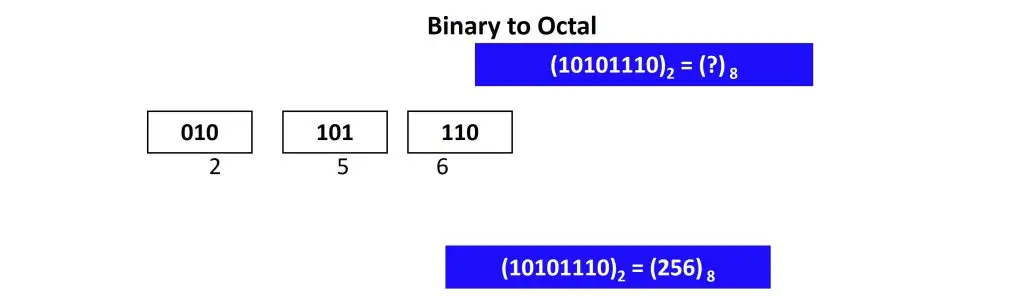
Binary to Octal Conversion
Binary numbers have a base of 2, while octal numbers have a base of 8. To convert a binary number to an octal number, the base is changed from 2 to 8.
Steps:
1. Group the Bits into Triplets
Starting from the binary point (the decimal point for binary), divide the binary number into groups of three.
- For Whole Numbers: Group from right to left.
- For Fractional Parts: Group from left to right.
2. Add Leading or Trailing Zeros
If the last group doesn’t have three bits, you must pad it with zeros to complete the triplet.
- Left Side: Add zeros to the far left of the whole number.
- Right Side: Add zeros to the far right of the fractional part.
Note: Adding these zeros does not change the value of the number, but it prevents calculation errors.
3. Convert Each Triplet to Decimal
Use the positional weights (22=4, 21=2, 20=1) to convert each 3-bit group into its equivalent decimal value (0 through 7).
| Octal | Binary |
| 0 | 000 |
| 1 | 001 |
| 2 | 010 |
| 3 | 011 |
| 4 | 100 |
| 5 | 101 |
| 6 | 110 |
| 7 | 111 |
Binary to Hexadecimal Conversion
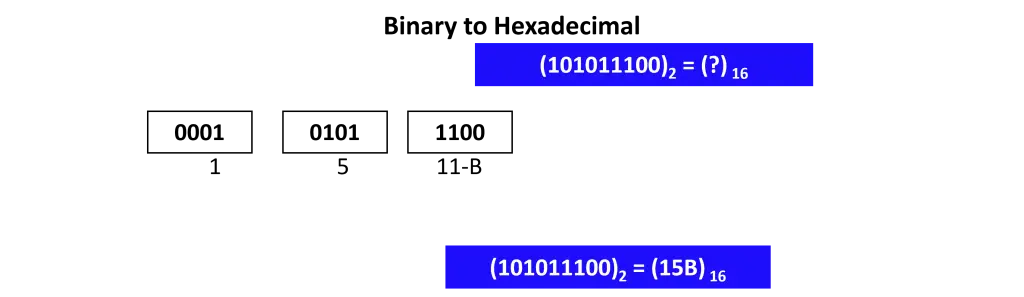
Binary numbers have a base of 2, while hexadecimal numbers have a base of 16. To convert a binary number to a hexadecimal number, group the digits appropriately and convert to the corresponding hexadecimal value.
Binary to Hexadecimal Conversion
To convert from binary (Base 2) to hexadecimal (Base 16), follow these steps:
- Group into Fours: Starting from the right (the least significant bit), divide the binary number into groups of four bits.
- Pad with Zeros: If the leftmost group has fewer than four bits, add leading zeros to complete the group.
- Assign Hex Values: Convert each 4-bit group into its equivalent hexadecimal digit (0-9, A-F).
Use the positional weights (23=8, 22=4, 21=2, 20=1) to convert each 4-bit group into its equivalent hexadecimal value (0 through 9 & A-F).
| Hexadecimal | Binary |
| 0 | 0000 |
| 1 | 0001 |
| 2 | 0010 |
| 3 | 0011 |
| 4 | 0100 |
| 5 | 0101 |
| 6 | 0110 |
| 7 | 0111 |
| 8 | 1000 |
| 9 | 1001 |
| 10-A | 1010 |
| 11-B | 1011 |
| 12-C | 1100 |
| 13-D | 1101 |
| 14-E | 1110 |
| 15-F | 1111 |

Published February 2026. Last verified and updated: March 2026.