Unit 1: Computer System
This note is made for NEB Grade 11 Computer Science. This post contains the complete notes for Unit 1, Grade 11 Computer System, presented in a simple, easy-to-understand way for all, completely based on the CDC syllabus.
1.1 Introduction to Computer
1.1.1 Definition, Characteristics & Application of Computer
Definition: A computer is an electronic device that accepts raw data as input, processes it under the control of a set of instructions (a program) stored in its memory, and gives the processed result as output. It works on the cycle: Input → Process → Output → Storage.
Characteristics of a Computer
- Speed: A computer can execute millions to billions of instructions per second. Speed is generally measured in MHz or GHz.
- Accuracy: Computers produce highly accurate, error-free results, provided the input data and instructions given are correct. Errors that occur are almost always due to human input, not the machine itself (Garbage In, Garbage Out principle).
- Diligence: Unlike humans, a computer does not get tired, bored, or lose concentration. It can perform the same task repeatedly, for hours, with the same speed and accuracy.
- Storage capacity: A computer can store a very large amount of data in a small physical space, and that data can be retrieved quickly whenever needed.
- Versatility: The same computer can be used for entirely different types of work (writing a document, playing music, browsing the internet, running scientific simulations) simply by changing the program/software.
- Automation: Once instructions are fed, a computer carries out the task automatically without needing step-by-step human intervention.
- No feeling / No IQ of its own: A computer has no feelings, emotions, or judgment of its own. It cannot make decisions outside the logic that has been explicitly programmed into it.
Application of Computer
- Education: e-learning platforms, digital libraries, online classes and examinations, research and referencing.
- Business & Commerce: billing, inventory management, payroll processing, accounting, online banking, e-commerce.
- Healthcare / Medicine: diagnosis and imaging (CT, MRI), maintaining patient records, robotic surgery, hospital management systems.
- Communication: email, instant messaging, social media, video conferencing.
- Government: e-governance services, national ID and civil registration systems, census and statistical data processing.
- Entertainment: video games, movie production/editing, music composition and streaming.
- Science & Engineering: simulations, modelling, weather forecasting, space research, CAD/CAM design.
- Defense & Security: navigation systems, surveillance, cryptography, missile guidance systems.
1.1.2 Evolution of Computer Technology
The history of computers is generally divided into five generations, each defined by the core electronic technology used to build the machine.
| Generation | Period | Core Technology | Key Features | Example |
|---|---|---|---|---|
| 1st | 1940–1956 | Vacuum tubes | Very large in size, generated huge heat, consumed massive electricity, used machine language only | ENIAC, UNIVAC |
| 2nd | 1956–1963 | Transistors | Smaller and more reliable than vacuum tubes, less heat, used assembly language | IBM 1401 |
| 3rd | 1964–1971 | Integrated Circuits (IC) | Smaller size, increased speed and reliability, use of high-level languages (COBOL, FORTRAN) | IBM 360 |
| 4th | 1971–present | Microprocessor (LSI/VLSI) | Entire CPU on a single chip, birth of personal computers, GUI-based operating systems | Personal Computers, Laptops |
| 5th | Present & beyond | Artificial Intelligence, ULSI | Focus on parallel processing, natural language processing, machine learning | AI assistants, robotics |
1.1.3 Measurement Units of Processing Speed and Storage Unit
Two quantities are commonly measured to describe a computer’s capability: how fast it processes instructions, and how much data it can store.
Unit of Processing Speed
Processing speed refers to how many clock cycles/instructions a processor can carry out per second, and is measured in Hertz (Hz).
| Unit | Value |
|---|---|
| Hertz (Hz) | 1 cycle per second |
| Kilohertz (KHz) | 10³ Hz = 1,000 Hz |
| Megahertz (MHz) | 10⁶ Hz = 1,000,000 Hz |
| Gigahertz (GHz) | 10⁹ Hz = 1,000,000,000 Hz |
Unit of Storage
Storage capacity is measured in bits and bytes, and their larger multiples.
| Unit | Equivalent To |
|---|---|
| Bit | Smallest unit of data; a single binary digit (0 or 1) |
| Byte | 8 bits |
| Kilobyte (KB) | 1024 Bytes |
| Megabyte (MB) | 1024 KB |
| Gigabyte (GB) | 1024 MB |
| Terabyte (TB) | 1024 GB |
| Petabyte (PB) | 1024 TB |
1.1.4 Super, Mainframe, Mini & Microcomputers
Computers are classified by their size, processing power, and the scale of tasks they are designed for.
| Type | Description | Typical Use |
|---|---|---|
| Supercomputer | The fastest, largest, and most expensive category of computer. Uses parallel processing with thousands of processors to handle extremely complex, large-scale calculations. | Weather forecasting, nuclear simulations, space research (e.g. PARAM, Cray, Fugaku) |
| Mainframe Computer | A large, powerful, and highly reliable computer capable of supporting hundreds or thousands of users and applications at the same time. | Banking transactions, airline reservation systems, large-scale census data (e.g. IBM Z series) |
| Minicomputer | A mid-sized, mid-range computer that is more powerful than a microcomputer but less powerful than a mainframe. Typically supports multiple users but on a smaller scale. | Departmental or small-business data processing, scientific/research labs |
| Microcomputer | The smallest and most common category, built around a single microprocessor chip. Designed for single-user use. | Desktop PCs, laptops, tablets, smartphones |
1.1.5 Mobile Computing and its Application
Definition: Mobile computing is a technology that allows data, voice, and video to be transmitted via a computer or other wireless-enabled device without being physically connected to a fixed network. It combines mobile communication, mobile hardware, and mobile software.
Key Elements of Mobile Computing
- Mobile Hardware: devices such as smartphones, tablets, laptops, and wearables that can send and receive data.
- Mobile Communication: the infrastructure (Wi-Fi, mobile networks like 4G/5G, Bluetooth) that ensures reliable and seamless data transfer.
- Mobile Software: the applications/apps that run on mobile hardware and handle its resources efficiently.
Applications of Mobile Computing
- Mobile banking, digital wallets, and online payment systems (e.g. eSewa, Khalti)
- GPS navigation and location-based services
- Mobile learning (m-learning), online classes, and study apps
- Social networking and instant messaging
- Remote work, cloud storage, and real-time collaboration tools
- Mobile health monitoring (fitness trackers, telemedicine apps)
1.2 Computer System and I/O Devices
1.2.1 Concept of Computer Architecture and Organization
Computer architecture describes the conceptual, functional design of a computer system as seen from a programmer’s point of view: what the system should do. This includes the instruction set, addressing modes, and data types the CPU supports.
Computer organization describes how the architecture is physically implemented in hardware: the actual circuits, control signals, memory technology, and peripherals that carry out the architecture’s design.
| Computer Architecture | Computer Organization |
|---|---|
| Deals with “what” the system does (functional behavior) | Deals with “how” the system does it (physical implementation) |
| Visible to the programmer | Hidden from the programmer; handled by hardware designers |
| Example: instruction set design | Example: control signals, circuit design |
Most modern computers follow the Von Neumann architecture, in which a single memory unit stores both program instructions and data, and the CPU fetches, decodes, and executes one instruction at a time in sequence.
1.2.2 Components of Computer System
A complete computer system is made up of five major functional units that work together:
- Input Unit: Accepts data and instructions from the outside world (user) and converts them into a form the computer can process, e.g. keyboard, mouse, scanner.
- Output Unit: Converts the processed data (results) back into a human-readable or usable form, e.g. monitor, printer, speaker.
- Processing Unit (CPU – Central Processing Unit): The “brain” of the computer; fetches, decodes, and executes instructions. Made up of the ALU, Control Unit, and Registers.
- Memory Unit (Primary Memory): Temporarily holds data, instructions, and intermediate results that the CPU is currently working with (RAM).
- Storage Unit (Secondary Storage): Permanently holds data, programs, and files even when the power is switched off (hard disk, SSD).
1.2.3 Microprocessor: Basic Concepts, Clock Speed, Word Length, Components and Functions
Definition: A microprocessor is a single silicon chip (Integrated Circuit) that contains the arithmetic, logic, and control circuitry required to perform the functions of a computer’s Central Processing Unit (CPU).
Clock Speed
Clock speed is the rate at which a microprocessor executes instructions/cycles, measured in Hertz (commonly GHz for modern processors). A higher clock speed generally allows more instructions to be processed per second, though actual performance also depends on architecture and core count.
Word Length
Word length is the number of bits a processor can process, or transfer in and out, in a single operation. Common word lengths are 8-bit, 16-bit, 32-bit, and 64-bit. A larger word length allows a processor to handle larger numbers and access more memory addresses at once.
Components of a Microprocessor
- ALU (Arithmetic Logic Unit): Performs all arithmetic operations (addition, subtraction, multiplication, division) and logical operations (AND, OR, NOT, comparisons).
- Control Unit (CU): Directs and coordinates the operations of the entire computer by generating control signals; it does not process data itself but manages how data flows.
- Registers: Small, extremely fast storage locations inside the CPU used to hold data, instructions, and addresses temporarily during processing (e.g. Accumulator, Program Counter, Instruction Register).
Functions of a Microprocessor
- Fetching instructions from memory
- Decoding the fetched instructions
- Executing arithmetic and logical operations
- Controlling the timing and sequence of operations across the whole system
- Communicating with memory and I/O devices via buses
1.2.4 Bus System: Data Bus, Address Bus and Control Bus
Definition: A bus is a set of parallel electrical pathways that carry data, addresses, and control signals between the CPU, memory, and input/output devices.
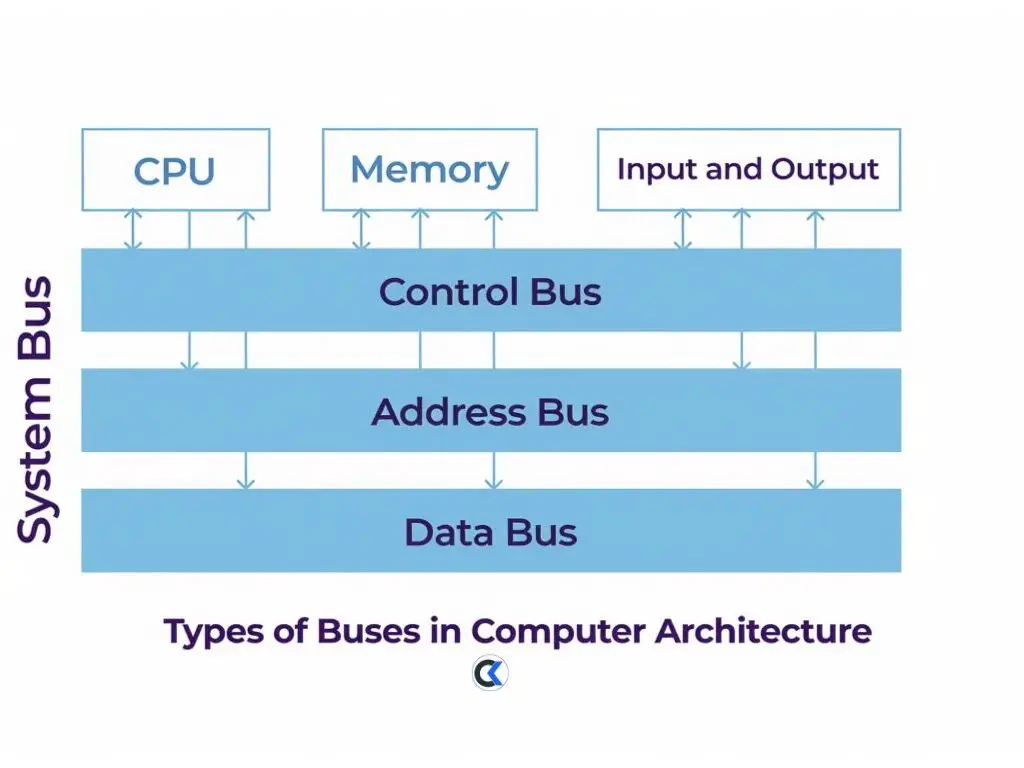
- Data Bus: Carries the actual data being transferred between the CPU, memory, and I/O devices. It is bi-directional, meaning data can flow in both directions. Its width (e.g. 32-bit, 64-bit) determines how much data can be moved at once.
- Address Bus: Carries the memory address that specifies where data should be read from or written to. It is uni-directional, meaning addresses flow only from CPU to memory/devices. Its width determines the maximum amount of memory the CPU can address.
- Control Bus: Carries control and timing signals (such as read, write, interrupt, and clock signals) that coordinate and synchronize the activities of all components connected to the bus.
1.2.5 Primary Memory: Definition, RAM, ROM, Cache, Buffer, Types of RAM and ROM
Definition: Primary memory (main memory) is memory that is directly accessible to the CPU and is used to hold data, instructions, and intermediate results that are currently being processed.
RAM (Random Access Memory)
RAM is volatile memory, meaning its contents are lost when the power is switched off. It is used for temporary storage of data and programs while they are being executed.
| Type of RAM | Description |
|---|---|
| SRAM (Static RAM) | Faster and more expensive; does not need to be refreshed constantly. Used in cache memory. |
| DRAM (Dynamic RAM) | Slower and cheaper than SRAM; needs to be refreshed thousands of times per second to retain data. Used as the main RAM in most computers. |
ROM (Read Only Memory)
ROM is non-volatile memory, meaning its contents remain even when power is off. It typically stores firmware/BIOS instructions that rarely change.
| Type of ROM | Description |
|---|---|
| PROM (Programmable ROM) | Can be programmed once by the user using a special device; cannot be erased or rewritten afterward. |
| EPROM (Erasable Programmable ROM) | Can be erased using ultraviolet light and then reprogrammed multiple times. |
| EEPROM (Electrically Erasable Programmable ROM) | Can be erased and reprogrammed electrically, without removing the chip, making it more flexible than EPROM. |
Cache Memory
Cache memory is a very small, extremely fast memory placed between the CPU and RAM. It stores frequently accessed data and instructions so the CPU does not have to fetch them from the slower main memory every time, thereby speeding up overall processing.
Buffer
A buffer is a temporary storage area used to hold data while it is being transferred between two devices that operate at different speeds. For example, a printer buffer temporarily stores data sent from the computer before it is printed, since the printer works slower than the CPU.
1.2.6 Secondary Memory
Definition: Secondary memory (auxiliary/backup storage) is non-volatile storage used to permanently store data, programs, and files even when the computer is switched off. It has larger capacity but slower access speed compared to primary memory.
- Magnetic Disk: Storage device (such as a Hard Disk Drive/HDD) that stores data magnetically on rapidly rotating circular platters, read/written using a magnetic head.
- Flash Memory: Solid-state, non-volatile storage with no moving mechanical parts, making it faster and more durable than magnetic disks (e.g. SSD, memory cards, USB pen drives).
- Optical Disk: Storage medium that uses laser light to read and write data on a reflective disk surface (e.g. CD, DVD, Blu-ray disk).
- External Storage Device: Any portable storage device that connects to a computer externally (typically via USB) to provide additional storage capacity (e.g. external hard drives, external SSDs).
- Memo Stick / Memory Stick: A small, compact, portable flash-memory storage device used for transferring and storing data between different devices.
1.2.7 Input Devices
Input devices allow a user to feed data and instructions into a computer.
| Device | Function |
|---|---|
| Keyboard | Allows manual entry of text, numbers, symbols, and commands using keys. |
| Mouse | A pointing device used to move the cursor, click, select, and interact with graphical elements on screen. |
| Scanner | Converts printed documents, photos, or images into digital form that can be stored and edited on a computer. |
| Light Pen | A light-sensitive pointing device that allows the user to draw, write, or select items directly on the screen. |
| OMR (Optical Mark Reader) | Detects and reads marks (such as filled bubbles) on a specially designed form, commonly used to check answer sheets. |
| OCR (Optical Character Reader) | Recognizes printed or handwritten characters from a scanned image and converts them into editable, machine-readable text. |
| BCR (Bar Code Reader) | Reads barcodes printed on products to quickly retrieve associated price/product information. |
| MICR (Magnetic Ink Character Recognition) | Reads characters printed with magnetic ink, most commonly used by banks to process cheques. |
| Touch Screen | A display that allows the user to interact directly with on-screen content by touching it, without needing a separate mouse or keyboard. |
| Microphone | Captures sound/voice and converts it into a digital audio signal for input. |
| Digital Camera | Captures still images or video and stores them digitally for transfer to a computer. |
1.2.8 Output Devices
Output devices convert processed data from the computer into a form that can be understood by the user.
| Device | Description |
|---|---|
| Monitor: LCD (Liquid Crystal Display) | Uses liquid crystals and a backlight to produce images; thinner, lighter, and more energy-efficient than older CRT monitors. |
| Monitor: LED (Light Emitting Diode) | A type of LCD monitor that uses LEDs for backlighting, offering better brightness, contrast, and energy efficiency. |
| Printer: Dot Matrix | An impact printer that forms characters using a set of pins striking an ink ribbon against paper; noisy and low quality, but cheap and good for multi-part forms. |
| Printer: Inkjet | A non-impact printer that sprays tiny droplets of liquid ink onto paper; produces good quality output at moderate cost, suitable for home/office use. |
| Printer: Laser | A non-impact printer that uses a laser beam and toner to produce high-quality, fast output; more expensive but efficient for high-volume printing. |
| Speaker | Converts electrical audio signals from the computer into audible sound output. |
1.2.9 Hardware Interfaces: Parallel Port, Serial Port, USB Ports, HDMI and Expansion Slots
A hardware interface (port) is a physical connection point on a computer that allows external devices to connect and communicate with it.
- Parallel Port: Transmits multiple bits of data simultaneously over several wires side by side; historically used to connect printers, but largely replaced by USB today.
- Serial Port: Transmits data one bit at a time, in sequence, over a single wire/channel; slower than parallel but more reliable over longer cable distances.
- USB (Universal Serial Bus) Ports: A widely-used standard interface for connecting a huge variety of peripherals (keyboards, mice, external drives, printers), offering both data transfer and, in many cases, power supply to the device.
- HDMI (High-Definition Multimedia Interface): A digital interface that transmits high-quality, uncompressed audio and video signals simultaneously to displays such as monitors, TVs, and projectors.
- Expansion Slots: Slots on the motherboard (such as PCIe slots) that allow additional expansion cards (graphics cards, sound cards, network cards) to be installed to extend the computer’s capabilities.
Quick Revision: Key Points
- Computer cycle: Input → Process → Output → Storage
- Key characteristics: speed, accuracy, diligence, storage capacity, versatility, automation, no IQ of its own
- 5 generations: Vacuum tubes → Transistors → IC → Microprocessor → AI/ULSI
- 1 Byte = 8 bits; 1 KB = 1024 Bytes; speed measured in Hz/MHz/GHz
- Power/size order: Supercomputer > Mainframe > Minicomputer > Microcomputer
- Architecture = what the system does; Organization = how it’s physically built
- CPU = ALU + Control Unit + Registers
- 3 buses: Data (bi-directional), Address (uni-directional), Control (signals)
- RAM = volatile (SRAM, DRAM); ROM = non-volatile (PROM, EPROM, EEPROM)
- Secondary storage: magnetic disk, flash memory, optical disk, external drives

Published August 2026. Last verified and updated: September 2026.