Unit 1: Computer Network and Communication
Complete notes covering telecommunication basics, communication media, connectors, networking devices, topologies, network types, architecture, IP addressing, and internet/intranet/extranet, based on the CDC syllabus.
1.1 Concept of Telecommunication and Key Terminology
Telecommunication refers to the exchange of information over a distance using electronic means, such as cables, radio waves, or satellites. It’s the foundation that allows computers, phones, and other devices to communicate with each other, whether across a room or across the world.
Key Terminology
Bandwidth: the maximum amount of data that can be transmitted over a network connection in a given time, usually measured in bits per second (bps), such as Mbps (megabits per second) or Gbps (gigabits per second). A higher bandwidth means more data can pass through at once, similar to a wider road allowing more cars to travel side by side.
Throughput: the actual amount of data successfully transmitted over a network in real conditions. While bandwidth is the theoretical maximum, throughput is what you actually get, which is often lower due to network congestion, interference, or hardware limits.
Broadband: a high-speed, high-capacity internet connection that can carry large amounts of data at once, allowing multiple types of data (voice, video, text) to travel simultaneously. Common broadband types include DSL, cable, and fiber-optic connections.
3G/4G/5G: generations of mobile network technology, each offering faster speeds and better reliability than the last:
- 3G: introduced mobile internet browsing and video calling, but at relatively slow speeds
- 4G: significantly faster, enabling smooth video streaming and quicker downloads
- 5G: the newest generation, offering extremely high speeds, very low delay (latency), and support for many more connected devices at once
Data Packets: when information travels over a network, it’s broken down into small chunks called packets, sent separately, and reassembled at the destination. Each packet contains the actual data along with addressing information showing where it came from and where it’s going.
Frequency: the number of times a signal wave repeats per second, measured in Hertz (Hz). In wireless communication, different frequency bands are used to transmit signals; for example, common Wi-Fi routers operate on 2.4 GHz and 5 GHz frequency bands.
Communication Mode
Data communication is transferring data and information between computers and other electronic devices. The two types of data communication are simplex mode and duplex mode.
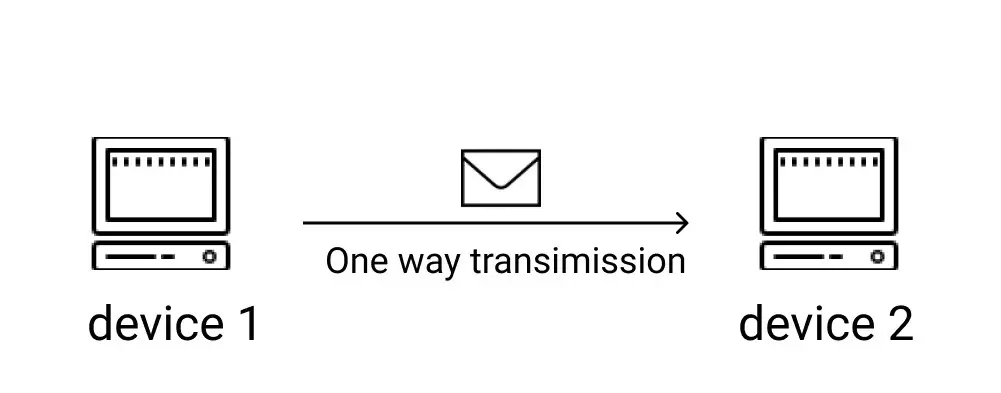
Simplex mode is the transmission of data and information that takes place in only one direction. It is the unidirectional mode of data transmission. Radio, newspaper, television broadcasting, books, etc. are examples of simplex mode.
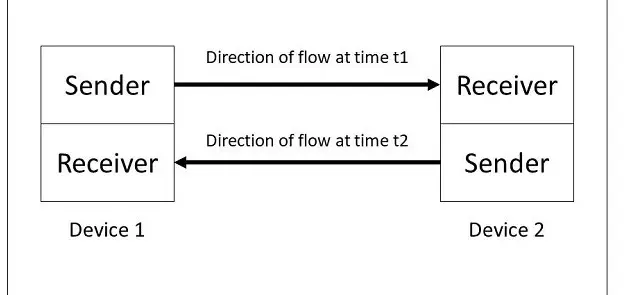
Half-duplex is a mode of data and information flow in both directions but, only one direction at a time. Walkie-talkies and wireless handsets are examples of half-duplex modes.
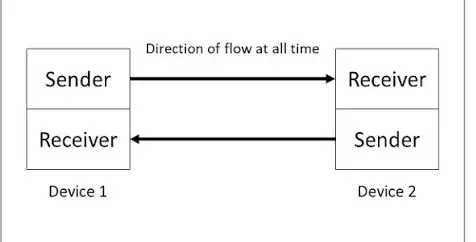
In full duplex mode, data and information flow in both directions simultaneously on the transmission path. Mobile and landline phones are examples of full-duplex mode.
1.2 Communication Channel / Media
A communication channel (or medium) is the physical or wireless path through which data travels between devices. These are divided into wired and wireless media.
Wired Media
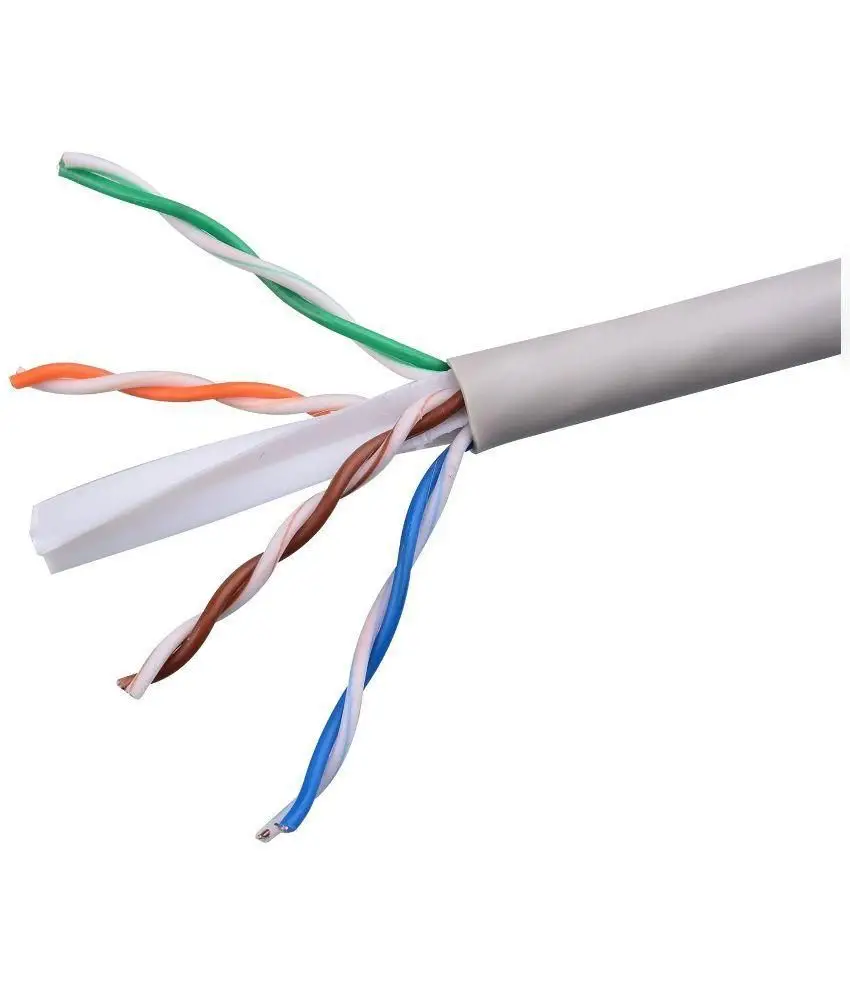
CAT6 (Category 6 cable): a type of twisted-pair copper cable widely used for wired Ethernet networks. It supports faster speeds and less interference than older cable categories like CAT5, commonly used to connect computers to routers or switches in homes, schools, and offices.
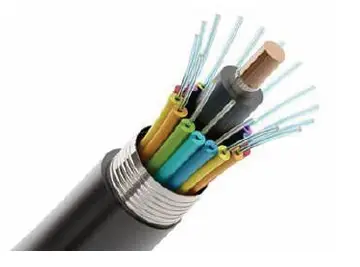
Optical Fiber: a cable that transmits data as pulses of light through thin strands of glass or plastic, rather than electrical signals. Fiber optic cables support extremely high speeds over long distances with very little signal loss, and are commonly used for internet backbones connecting cities and countries.
Wireless Media
Wi-Fi: a wireless technology that allows devices to connect to a network using radio waves, without physical cables, commonly used for home and office internet access.
Bluetooth: a short-range wireless technology used to connect nearby devices, such as connecting a phone to wireless earphones or a keyboard to a laptop.
RFID (Radio Frequency Identification): uses radio waves to identify and track tags attached to objects, commonly used in inventory systems, access cards, and toll payment systems.
Satellites: a method of sending information wirelessly worldwide using artificial satellites placed in outer space. It has been in use since 1965 for services like telecommunication, radio, television, and the Internet.
| Guided Media | Unguided Media |
|---|---|
| Data and signals are sent through wires or cables. | Data and signals are sent through the air without wires. |
| Not affected by weather conditions like rain or wind. | Can be affected by weather conditions like rain or wind. |
| Used to connect close devices such as in a Local Area Network (LAN). | Used to connect devices far away such as in a Wide Area Network (WAN). |
| Provides a fixed path or direction for data. | No fixed path; data travels freely through the air. |
| Also called wired or guided media. | Also called wireless or unguided media. |
| Examples: CAT6 cable, Coaxial cable, Optical fiber. | Examples: Wi-Fi, Bluetooth, Microwave, Satellite, Infrared. |
1.3 Connector: RJ45, Media Convertor
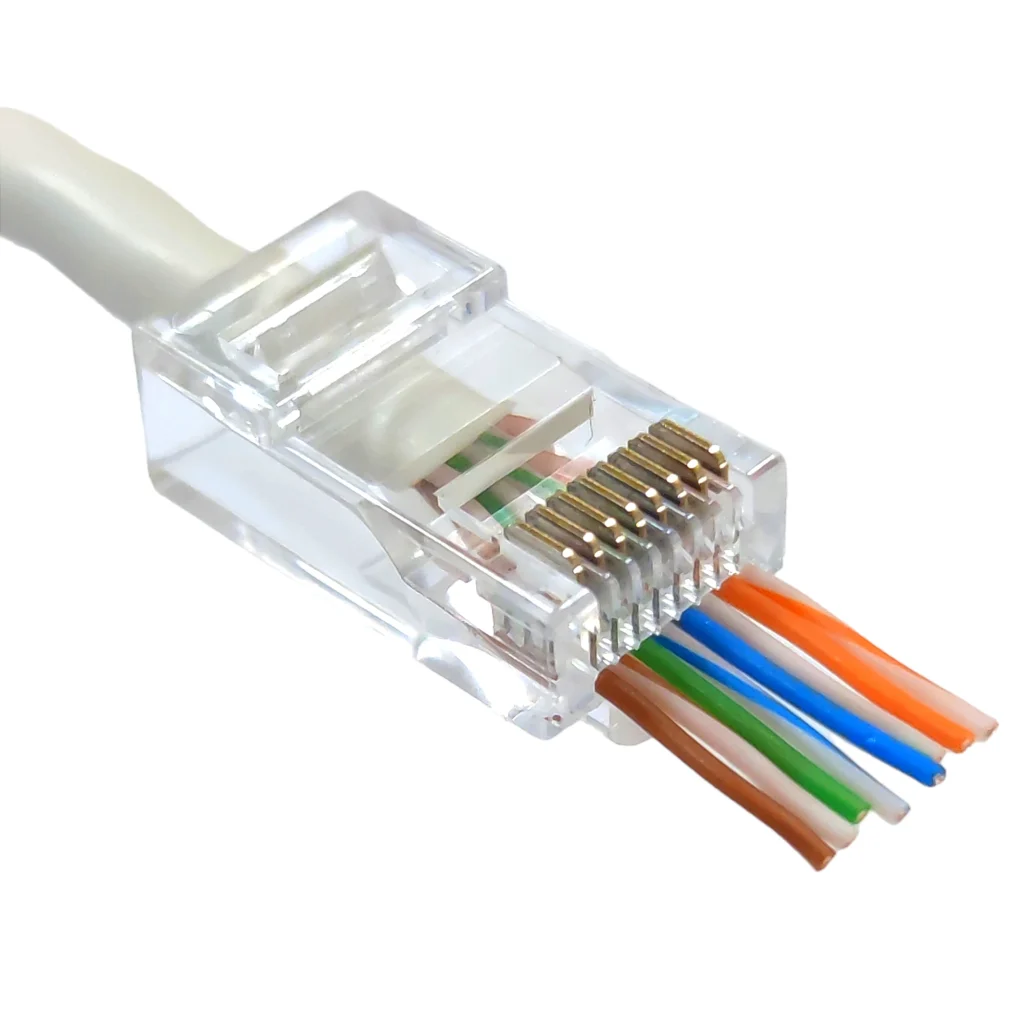
Registered Jack 45(RJ45): The RJ45 connector is a standardized interface for connecting Ethernet cables to network devices like computers, routers, and switches. It features eight pins in a modular jack format, easy insertion and removal, and follows specific wiring schemes. It supports reliable, high-speed data transmission over Ethernet networks.
Media Converter: a device that converts one type of network signal into another, most commonly used to connect a fiber optic cable segment to a copper Ethernet cable segment (or vice versa). This allows networks using different types of cabling to communicate with each other without needing to replace the entire cabling system.
1.4 Networking Devices
Computer networks are used for the Internet, e-mail, chat, e-banking, etc. The hardware, software, and medium are components of computer network. Network Operating System (NOS) and application software are the software used as network software.
Repeater: a device that receives a network signal, strengthens (amplifies) it, and retransmits it, used to extend the range of a network when a signal would otherwise weaken over long distances.
Hub: a basic networking device that connects multiple computers together, but simply broadcasts any incoming data to all connected devices, regardless of which one it’s actually meant for. This makes hubs simple but inefficient, and they are largely outdated today.
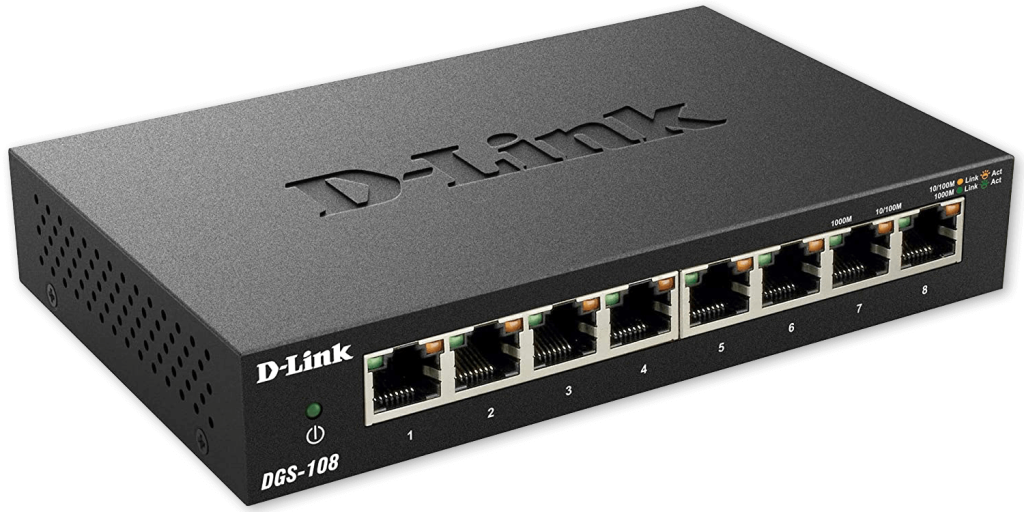
Switch: similar to a hub, but smarter it sends data only to the specific device it’s intended for, based on that device’s address, rather than broadcasting to everyone. This makes switches far more efficient and is why switches have mostly replaced hubs in modern networks.
Bridge: a device that connects two separate network segments together, making them function as one larger network, while also filtering traffic to reduce unnecessary data between the segments.
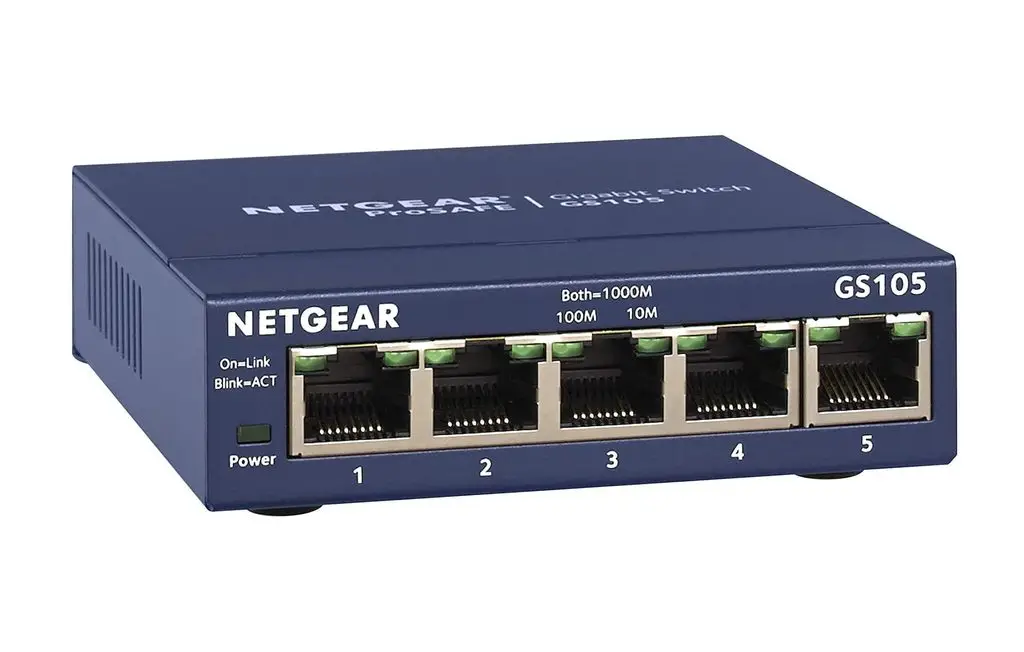
Router: a device that connects different networks together, most commonly connecting a home or office network to the wider internet. A router directs (routes) data packets to their correct destination based on IP addresses, and often also assigns IP addresses to devices on the local network.
| Device | Main Function |
| Repeater | Strengthens and extends a signal |
| Hub | Connects devices, broadcasts data to all |
| Switch | Connects devices, sends data only to the intended one |
| Bridge | Joins two network segments into one |
| Router | Connects different networks, directs data using IP addresses |
1.5 Topologies
Network topology is the inter-connected pattern of network components. A network topology may be physical, mapping hardware configuration, or logical, mapping the path that the data must take to travel around the network. A LAN Topology is a cabling structure or pattern of computers in a local area.
Bus Topology
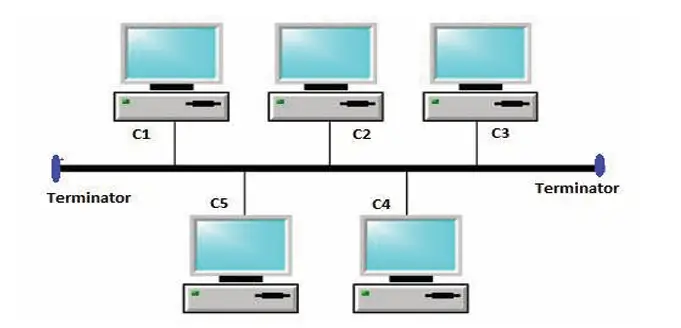
All nodes and network devices are connected to a single cable called bus topology. Terminators are attached at the cable’s starting and ending points. When it has exactly two endpoints, then it is called linear bus topology.
Features
- Simple design
- Requires less cable
- Relatively inexpensive
- Suitable for small networks
- Easy to understand
Disadvantage
- If the main cable fails, the network can be affected.
Star Topology
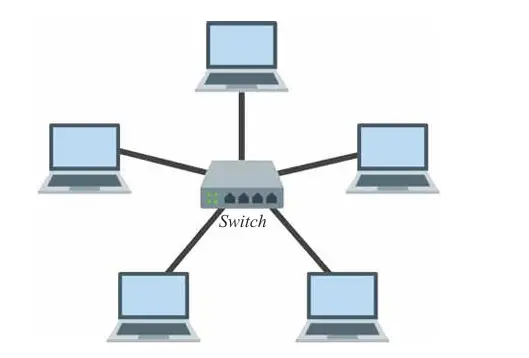
It is a type of topology that connects all nodes to a central device called hub/ switch through a cable. It is probably the most common topology. Switch acts as a repeater for data flow. Star topology can be used with twisted pair, Optical Fiber and coaxial cable.
Features
- Easy to install
- Easy to troubleshoot
- Easy to expand
- Fast performance
- Failure of one node normally does not affect other nodes
Disadvantage
- If the central switch or hub fails, the connected network can be affected.
Ring Topology
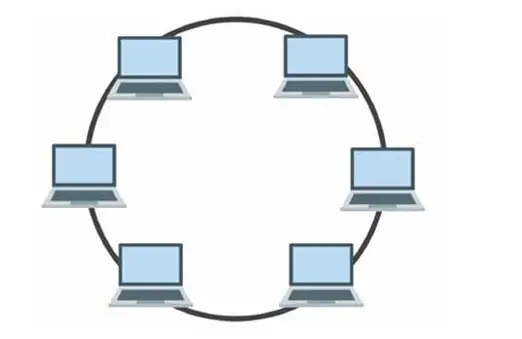
Ring topology forms a closed loop as each computer is connected to another computer with the last one connected to the first which is called ring topology. It uses fiber optic cable to transfer data. Each and every computer has equal responsibilities.
Features
- Devices form a closed loop
- Data is transferred sequentially
- Each computer has an active role in communication
- Repeaters may be used when there are many nodes
Hybrid Topology
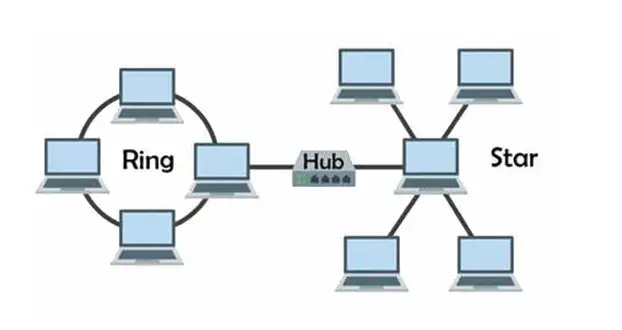
A combination of two or more topologies in one network, for example, several star clusters linked by a shared bus backbone. Larger organizations use this to connect departments while keeping the strengths of each individual topology, and to reduce the chance of a complete network failure.
Features
- Flexible
- Scalable
- Can combine advantages of different topologies
- Suitable for large networks
1.6 Overview of Networks Based on Coverage
A computer network is a group of two or more computers and devices connected through wire or wireless media to exchange data and information and share hardware, software, and other resources. the interconnection of many computers to share information is called a computer network. It can share resources like scanners, printers, hard disks, operating system software, application software, etc.
Networks are also classified by how large an area they cover.
PAN (Personal Area Network)
It is used for connecting devices close to an individual, typically within a range of a few meters. The PANs are designed for personal use and facilitate communication and data sharing between devices such as smartphones, tablets etc
LAN (Local Area Network)
It is a network limited to small areas like a room, a building, a school, a college, etc. It is generally connected through wire media. It can cover up to one kilometer for transferring data and information between the computers.
Features
- Small coverage area
- High data transfer speed
- Low transmission error
- Can use wired or wireless connections
MAN (Metropolitan Area Network)
MAN covers within an area like a valley, city, metropolitan, etc. connected through wire or wireless technology or media. It covers more area than the LAN and less area than the WAN. It has a higher data transfer capacity than the WAN and is slower than the LAN.
WAN (Wide Area Network)
A Wide Area Network is a network that is extended to a large geographical area in which computers are connected through wireless technology or media as satellite communication. It is the largest computer network. Internet, 4G Mobile Broadband Systems, and satellite communication are the best examples of the WAN.
| Network Type | Typical Coverage |
| PAN | A few meters (around one person) |
| LAN | A single building or school |
| MAN | A city or large campus |
| WAN | Countries or continents (e. g. the internet) |
1.7 Network Architecture
Network architecture defines how the computer communicates and interact with each other on the network. It is the combined form of topologies and data transmission modes between the different computers in the network. The two types of network architecture are:
Client-Server Architecture
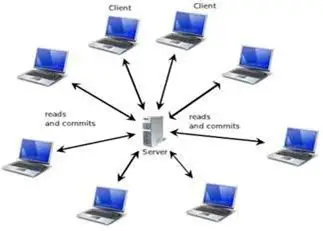
In this model, one or more powerful central computers (servers) provide services, data, or resources, while other computers (clients) request and use those services. There exists a central controller that is called a server. A server is a specialized computer that controls the network resources and provides services to other computers in the network. MS Windows Server, Linux are example of OS of Client-server.
Features
- Centralized control
- Centralized backup is possible
- Better management
- Better security through centralized administration
- Suitable for larger networks
Peer-to-Peer (P2P) Architecture
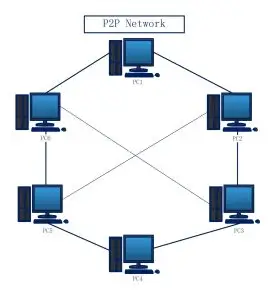
In this model, every device has equal standing, acting as both client and server, sharing files and resources directly without a central server. No dedicated administrator is needed, and one peer going offline doesn’t affect the others. It suits small setups like a home or a small office, but gets harder to manage and secure as it grows.
Features
- Simple to set up
- Low cost
- No dedicated server required
- Suitable for small networks
- Each user can control their shared resources
Network Protocols
A set of rules followed for interconnection and communication between computers in a network is called a protocol.
- TCP/IP (Transmission Control Protocol/Internet Protocol) is used on the Internet.
- HTTP (Hypertext Transfer Protocol) is used to transfer HTML documents in WWW.
- HTTPS (Hypertext Transfer Protocol Secure) is a secure way to send and receive information on websites, protecting your data from hackers.
- DHCP (Dynamic Host Configuration Protocol) is a system that automatically gives devices on a network an IP address so they can connect to the internet.
- SMTP (Simple Mail Transfer Protocol) is used in sending e-mail.
- FTP (File Transfer Protocol) is used to transmit files between computers
1.8 Concept of IP Addressing
An IP address (Internet Protocol address) is a unique numerical label assigned to every device connected to a network, allowing devices to identify and communicate with each other, similar to how a house address allows mail to reach the correct destination.
IPv4
IPv4 is the older and still widely used version of IP addressing, written as four numbers (each from 0 to 255) separated by dots. E.g 192.168.1.1 IPv4 can support around 4.3 billion unique addresses, which sounded like a huge number when it was designed, but has become insufficient given the massive growth in internet-connected devices worldwide.
IPv6
IPv6 is the newer version, designed to solve IPv4’s address shortage. It uses a much longer format, written as eight groups of hexadecimal numbers separated by colons. E.g 2001:0db8:85a3:0000:0000:8a2e:0370:7334 IPv6 provides an enormously larger number of possible addresses, ensuring that every device in the world, now and in the future, can have its own unique address.
| IPv4 | IPv6 |
| 32-bit address | 128-bit address |
| Written in decimal, separated by dots | Written in hexadecimal, separated by colons |
| About 4.3 billion addresses | Vastly larger address space |
1.9 Concept of Internet, Intranet, and Extranet
Internet: a global network connecting millions of smaller networks and devices worldwide, open and accessible to the public.
Intranet: a private network, based on the same technology as the internet, but restricted for use within a single organization, such as a school or company. It’s used to share internal resources, documents, or announcements only among authorized members, and is not accessible to the general public.
Extranet: an extension of an intranet that allows limited, controlled access to selected outside parties, such as suppliers, business partners, or specific clients, while still keeping the rest of the network private. It sits between a fully private intranet and the fully open internet.
| Network | Who Can Access It |
| Internet | Everyone, worldwide |
| Intranet | Only members of one organization |
| Extranet | Organization members plus select outside partners |
Here we have compariosn table of Internet, Intranet and Extranet
Practice Questions
- Define the terms Bandwidth, Throughput, and Data Packets in telecommunication.
- List two differences between wired media and wireless media with examples.
- What is an RJ-45 connector, and where is it commonly used?
- Explain the function of a Router in a computer network.
- Define IP Address and write down the format of an IPv4 address.
- What is Star Topology? Draw a neat diagram showing its layout.
- Distinguish between LAN (Local Area Network) and WAN (Wide Area Network).
- Briefly explain the role of a Switch versus a Hub in local networking.
Short-Answer Questions
- What is broadband?
- Define bandwidth.
- What is a data packet?
- What is frequency?
- What is the function of a repeater?
- What is a computer network?
- Why is wireless communication popular?
- What is an RJ45 connector?
- What is a media converter?
- Differentiate between bandwidth and throughput.
- How does Wi-Fi transmit data?
- How does data travel from one computer to another?
- How does data flow in ring topology?
- Mention one use of satellite communication.
- Give examples of guided and unguided media.
Long-Answer Questions
- What is communication media? Explain.
- Differentiate between LAN and MAN.
- Differentiate between client-server and peer-to-peer networks.
- Explain a suitable network for a school with multiple buildings.
- Design a simple home network.
- Compare client-server and peer-to-peer networks for a small office.
- Design a simple school computer laboratory network.

Published July 2026. Last verified and updated: September 2026.